Training Institute
Participants List
View and print the complete list of approved participants enrolled in each training schedule assigned to your institute.
Purpose
Before training begins, verify who is enrolled. The Participants List shows every trainee with an APPROVED nomination for a given schedule — their name, department, and institute. You can print this list for physical registration on the first day.
Participants List Flow
flowchart TD
A([Open Training Schedule]) --> B[Click Participants]
B --> C[Approved Participants View Loads]
C --> D[List of all APPROVED trainees]
D --> E[Name · Department · Institute]
D --> F{Action}
F --> G[View online list]
F --> H[Click Print Participants]
H --> I[Printable page opens]
I --> J[Print physical copy]
J --> K[Use for sign-in on Day 1]
Participants List Screen
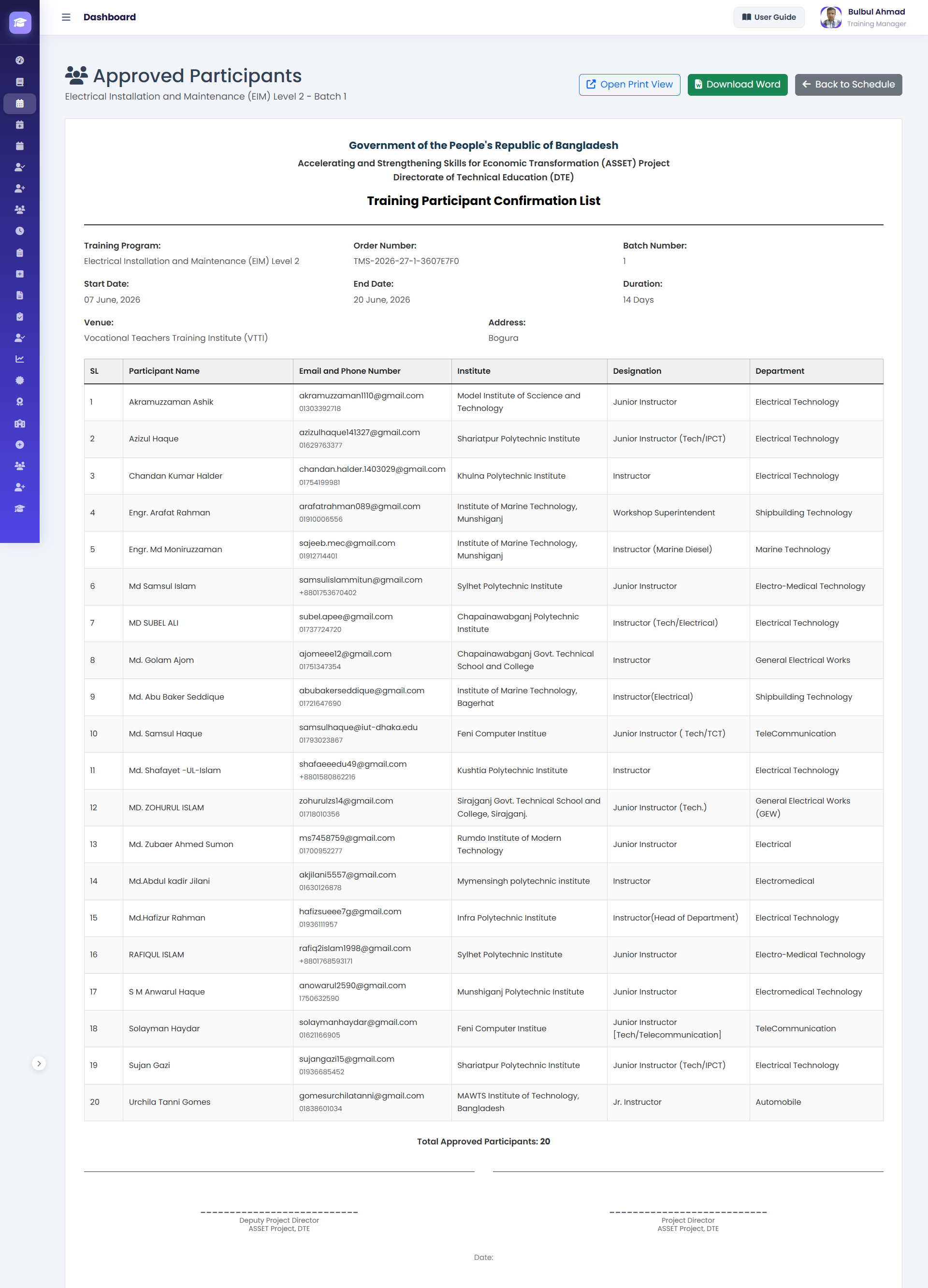
1Schedule Header — Programme name, dates, and total participant count shown at the top.
2Participant Table — Each row: #, Name, Department/School, Institute, Nomination Date.
3Print Button — Generates a clean, print-optimised version of the list at
/participants/print/.How to View and Print Participants
- 1Open the Schedule
Navigate to the training schedule from your dashboard or the Assigned Schedules page.
- 2Click Participants
Press the Participants or View Participants button. URL:
/training/schedules/<id>/participants/ - 3Review the List
Verify names and participant count. Only trainees with APPROVED nomination status appear here.
💡 If someone expected to attend is not on this list, they were not approved. They should contact their Institute Head. - 4Print if Needed
Click Print Participants List. This opens a print-optimised page. Use Ctrl+P to print. Use the printed list for physical sign-in registration on Day 1.
Participant Record Fields
| Field | Description |
|---|---|
| # | Sequential participant number in this schedule. |
| Name | Full name of the approved participant. |
| Department / School | Department or school the trainee belongs to. |
| Institute | Institute the trainee is from. |
| Nomination Date | Date the nomination was approved. |
| Status | APPROVED — only approved participants are listed. |
🎉 Guide Complete!
You have reached the end of the TMS User Guide. All four roles — Training Manager, Institute Head, Teacher, and Training Institute — have been covered.